Skip to content
Try free for 15 days

Upwork video proposals.
Record once.
Reuse across jobs.

Upload an introduction you can reuse. Choose a saved template, paste an Upwork job link and select relevant portfolio work. Pitching Pilot combines them into a new video for that job.

Your trial includes 300 video credits, two templates, videos up to two minutes and basic viewing analytics. It expires after 15 days without an automatic charge.

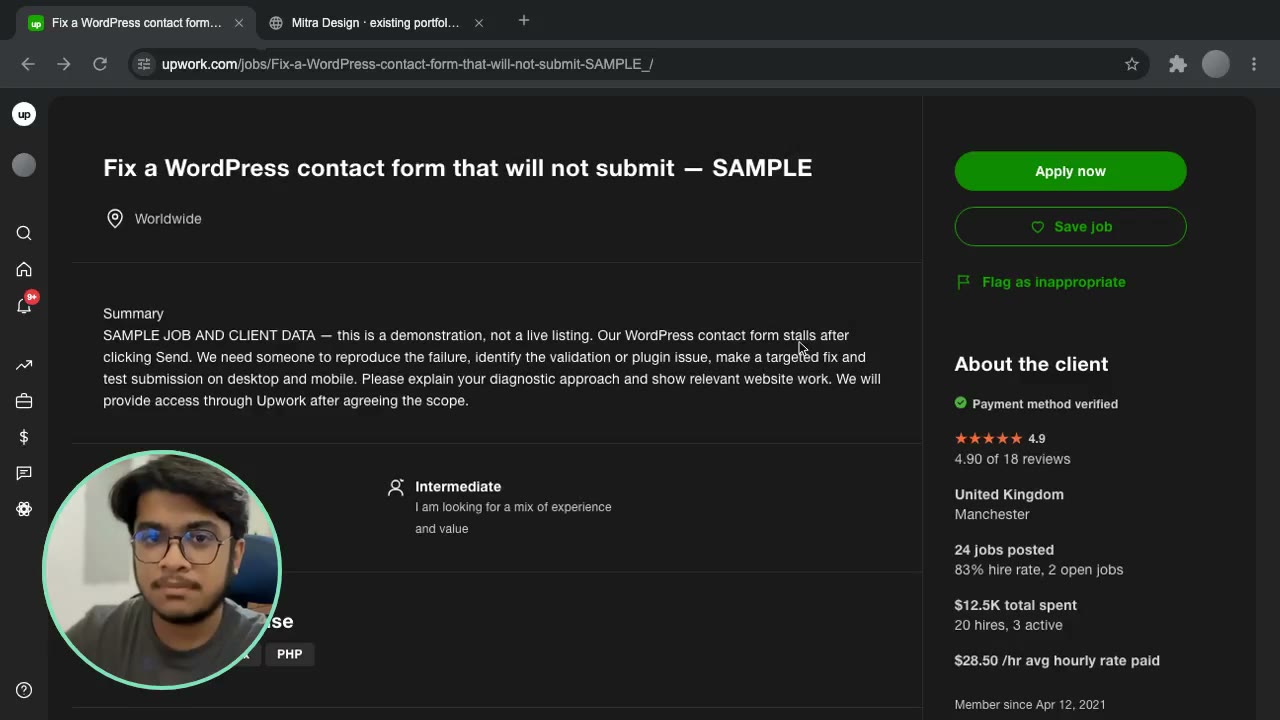
See the generated video33-second video proposal
See how sharing works
Your introduction, the job brief and selected work in one shareable video. Job and client details shown here are examples.
Read the demo transcript

“Hey there, I just came across your job post, and I’ve worked on plenty of similar WordPress issues before. For a straightforward fix like this, I can usually get it done in an hour or so of getting access. I’ve been working with WordPress for over eight years now. Here are some websites that I’ve worked on. I am also Top Rated on Upwork with only five-star reviews, so you’re in good hands. Hoping to hear back from you. Take care. Bye-bye.”

What is an Upwork
video proposal?

A video cover letter lets a potential client see you, hear your explanation and watch relevant work. It gives your pitch a face and a demonstration they can evaluate, instead of relying on text alone.

With Pitching Pilot, you record an introduction for a type of work, then reuse it with different job briefs and portfolio selections. Each output pairs your recording with the job you are applying to.

Add its link to your Upwork cover letter with a short description of what the client will see, and answer the job’s screening questions.

One bug-fix introduction.
Ready for the next relevant job.

Keep the recording neutral. Let the job brief and selected work give each version its context.

EXAMPLE UPWORK JOB

Fix a WordPress contact form that will not submit

The form stalls after clicking Send. Find the cause, fix it and test submission on desktop and mobile.

Same recording
Website bug-fix introduction
Work to select
Form validation and successful submission

Ask for the error message and the steps that reproduce it.
Build the reusable part once

Your introduction: explain the website problems you handle, how you diagnose them and what you test before handing the work back.

Your proof library: prepare examples of a broken form, a checkout issue and a mobile navigation fix. Show the issue, the change and the working result.

For each application: choose the relevant template, paste the new job link and select the closest examples. The recording stays the same; the job context and work on screen change.

Use work you own or have permission to show.

See the reusable recording format

Record once for a scenario.
Choose the details for each job.

You supply the narration and work. Pitching Pilot handles the saved sequence and composition.

  1. Upload your own recording

    Record with your usual camera or screen-recording tool, then upload the file to your media library. Keep the introduction focused on a type of work so it can fit several relevant jobs.

  2. Build a reusable template

    Select a talking recording, arrange job and portfolio scenes, set their durations, and position or hide the face bubble. Save portfolio slots for work you will choose later.

  3. Paste the job link and choose work

    In “Make your next introduction,” select your template and fill its portfolio slots with websites, images or screen recordings. Review the job details and choose work that addresses this brief.

  4. Generate, watch, then share

    Your video renders in the background. When it’s ready, review the result, then copy its share link into your Upwork proposal or message where permitted. You submit the application yourself.

Your shareable video proposal
Replies stay on Upwork
Your client watches the video and uses the reply link to return to the Upwork job.

Your first setup is the main recording and editing work. After that, reuse the template and select the right proof for each job. Rendering runs in the background; review the finished video before sharing.

A reusable format.
Your own words.

Start with roughly 45–60 seconds. Give every part a purpose, and time your screen scenes to match the recording.

For a reusable introduction, talk about the scenario you solve. Keep client names, job titles and one-off promises out of the saved recording.

Introduce · 0–10s

Who you help and what you fix

Name your specialty and the type of problem this template addresses. Let the job scene supply the specific brief.

Demonstrate · 10–30s

Make your work visible

Show two or three relevant examples. For each, explain the issue, your change and how you checked the result.

Explain · 30–45s

Describe your approach

Outline a repeatable process: reproduce the issue, diagnose it, make the fix and test the affected flow.

Invite · 45–60s

Give the client a next step

Ask them to reply on Upwork with the information you need to get started. Keep that invitation relevant across jobs.

Make a template
for every scenario you cover.

Bug fixes

A neutral diagnostic introduction, then before-and-after examples of forms, checkout or mobile behavior.

New builds

An introduction to your build process, followed by relevant websites or interfaces and how you would organize delivery.

Redesigns

A walkthrough of your design approach, with examples of clearer navigation, stronger hierarchy and responsive layouts.

Choose the template that matches the brief, then swap in the right work. If a job needs a different spoken explanation, save another recording for that scenario. Your template allowance depends on your plan.

A link your client
can open and watch.

A ready video has a share page with a player and a “Reply on Upwork” action linking back to the job. The standard viewer has no contact form, email field or external booking link. The next step leads back to Upwork.

The client opens your link to watch. You keep messages, project discussions and hiring on Upwork. Anyone with the link can access the video, so share only material you are comfortable making public.

In your cover letter, say what is worth watching: a short introduction to your bug-fix process and the relevant examples you selected.

Your video.
Your domain.

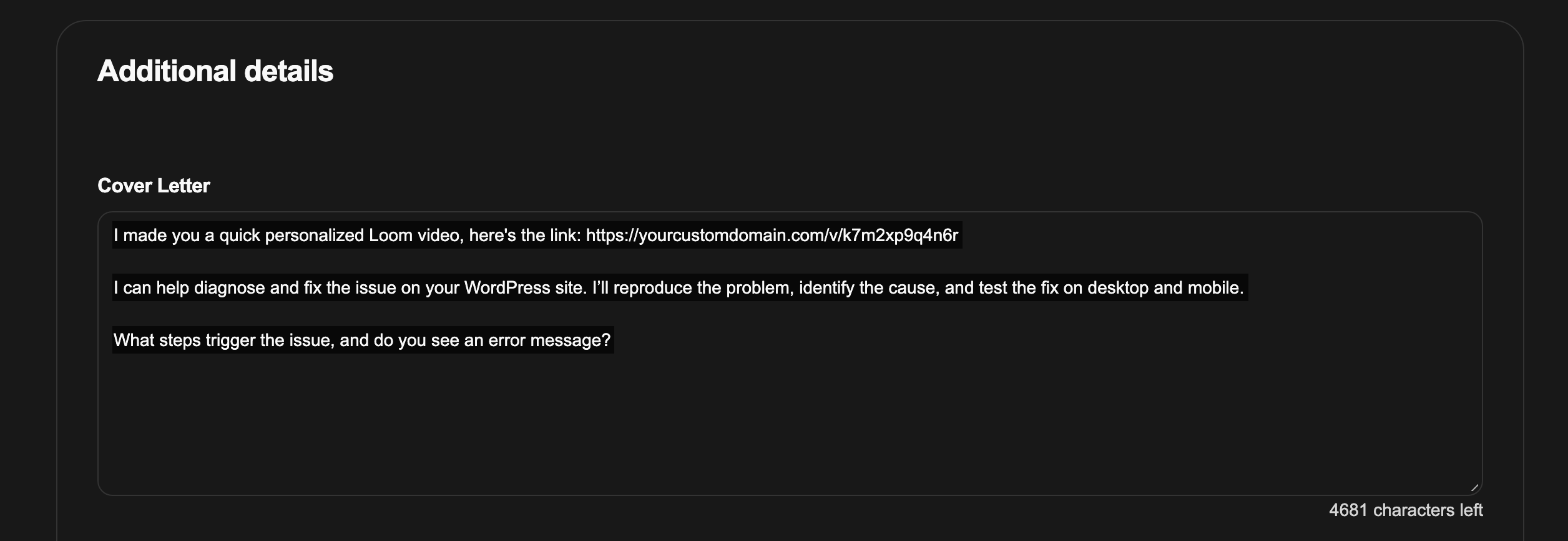
White-label your video links with a domain you own, like loom.yourdomain.com. That’s the address your client receives in your Upwork proposal and sees in their browser while watching.

Your shared video URL uses your domain instead of pitchingpilot.com. Pitching Pilot handles the video behind the scenes; your client opens your link, watches on your domain and replies through Upwork.

  1. Connect a subdomain you own using the provided video-page package and HTTPS hosting.
  2. Copy your video link with your custom domain.
  3. Share it in your proposal. Your client watches on your domain.

Connect one subdomain per account. Videos you’ve already created can use it too.

loom.yourdomain.com/v/abc123def456

Your domain in their browser

The address stays yours while your client watches.

Video proposal with a presenter and job brief, shown beneath an example custom-domain address
Your custom domain carries through from the proposal link to the video page.
Custom-domain video link shown in an Upwork proposal: yourcustomdomain.com appears in the URL the client receives.
The video link in your proposal carries your domain. Here, yourcustomdomain.com is the address the client sees.

A video view tells you
about the video.

See how your videos are watched and which actions viewers take next. These analytics measure video activity, separately from proposal views on Upwork.

Video engagement at a glance
  1. Video page openedViewing session
  2. Playback startedPlayback session
  3. Video completedAt least 95% watched
  4. Reply / download action clickedCTA-click session
  5. Job wonConfirm in Upwork · Not tracked here

Detailed video engagement is available on eligible plans. Check replies, contracts and hires directly in Upwork.

Basic analytics
Viewing sessions and active watch time. Included with the current Alerts trial.
Engagement analytics
On eligible plans: playback sessions, average watched, completion, reply/download click sessions and template comparisons. Completion means at least 95% of the video was covered.
Reading your results
Sessions count visits, so the same person can appear more than once. A reply-button click shows someone clicked through to Upwork; it does not confirm that they sent a message.

Before you
make your first video.

Does changing the job link personalize my spoken introduction?

No. It changes the job context used in the composition. Your uploaded narration stays the same. Use neutral wording only where it honestly fits, and upload a new recording when you need to name the client, discuss a specific problem or propose different work.

Are websites recorded live?

Website scenes use screenshots with simulated scrolling and cursor movement. For an actual interaction, upload a screen recording. Its own audio is discarded; your selected talking recording supplies narration. Check that timing and narration agree before sharing.

What if job details or a website cannot be loaded?

If a job is private, removed or missing details, or a website capture fails, check the affected scene before sharing. Replace unsuitable content or retry the video when the source is available.

How do video credits work?

One credit covers one generated second, rounded up when the video completes. A 33-second video uses 33 credits; a 60-second video uses 60. The current trial includes 300 credits, two templates, a two-minute per-video limit and 1 GB of storage. Other plan limits differ. Check your workspace balance before generating.

Can I try this today?

Start with a 15-day trial, with no card required. The trial expires without an automatic charge. Existing users can log in to check their access. Log in to your workspace.

Do I submit the proposal myself?

Yes. Review your video, add its link to your cover letter and submit your application on Upwork. Pitching Pilot prepares the video; you choose which jobs to apply for and when to send it.

Make your first template.
Reuse it for the next right job.

Record your introduction, save the sequence and keep your relevant work ready for the next application.

Your trial includes 300 video credits, two templates, videos up to two minutes and basic viewing analytics. It expires after 15 days without an automatic charge.

Still looking for suitable projects? See how Upwork job alerts and filters work.